Inkveil

PDF redaction for Windows

Black out personal data in a folder of PDFs. For real.

Inkveil finds names, Social Security numbers, birth dates, phone numbers, emails and addresses — even handwriting on scanned forms. You check each one, then it removes them so nothing can be copied back out.

Runs on your computer. Your files never leave it.
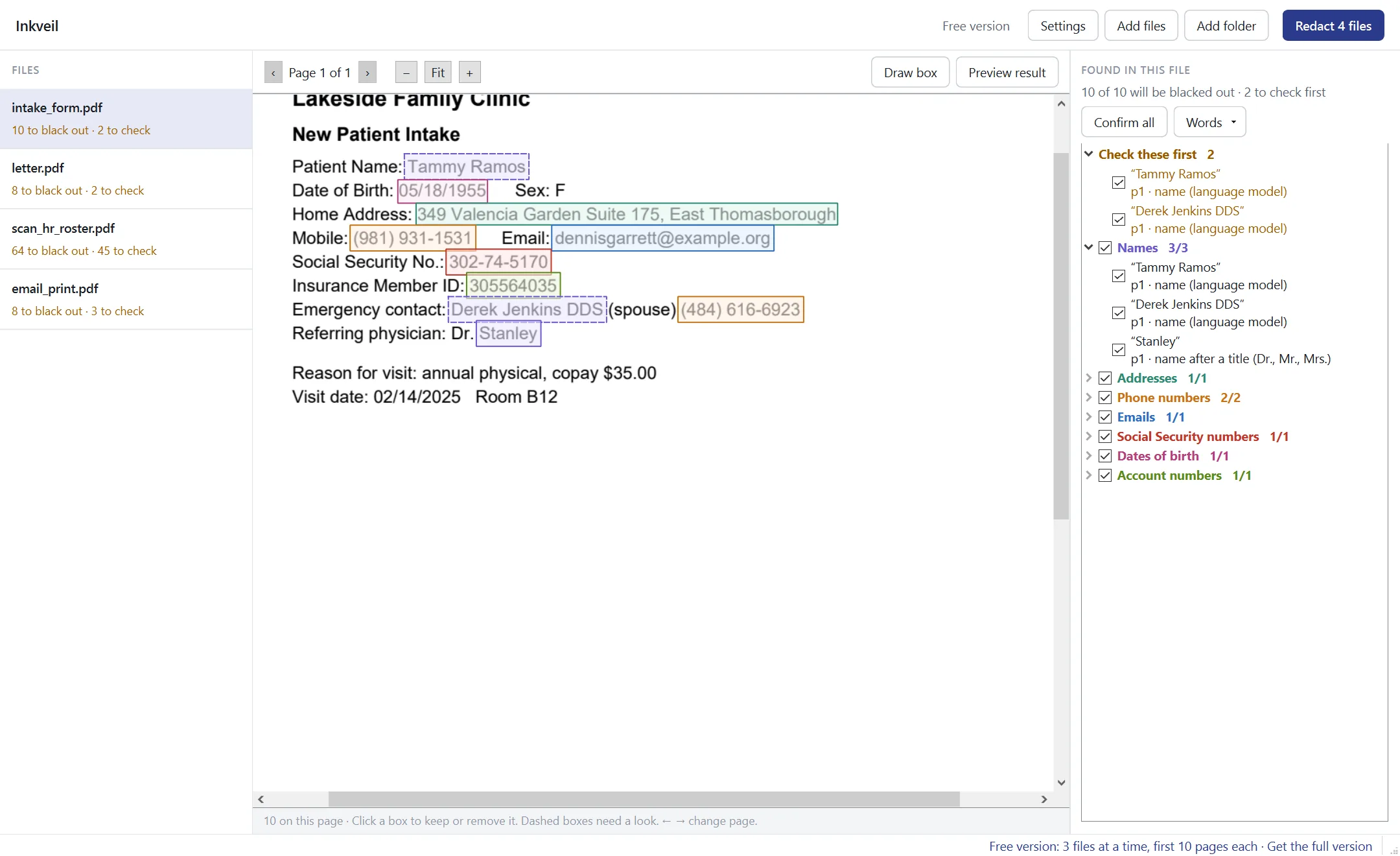
Inkveil showing a patient intake form with names, a birth date, address, phone numbers, email and Social Security number outlined for review

How it works

Drop a folder in. Check. Redact.

1. Find

Every page is read — typed text, scanned pages and fillable forms. Each finding is outlined on the page and listed with the reason it was flagged.

2. Review

Click a box to keep or remove it. Anything the program wasn't sure about is listed first. Draw your own boxes, add words to always remove, or never remove.

3. Remove for good

Redacted pages are rebuilt so the text underneath no longer exists. Metadata, comments and hidden attachments are stripped. A final check confirms nothing came back.
NamesSocial Security numbersDates of birthPhone numbersEmailsStreet addressesAccount and member IDsCard numbersHandwritten form entriesYour own word list
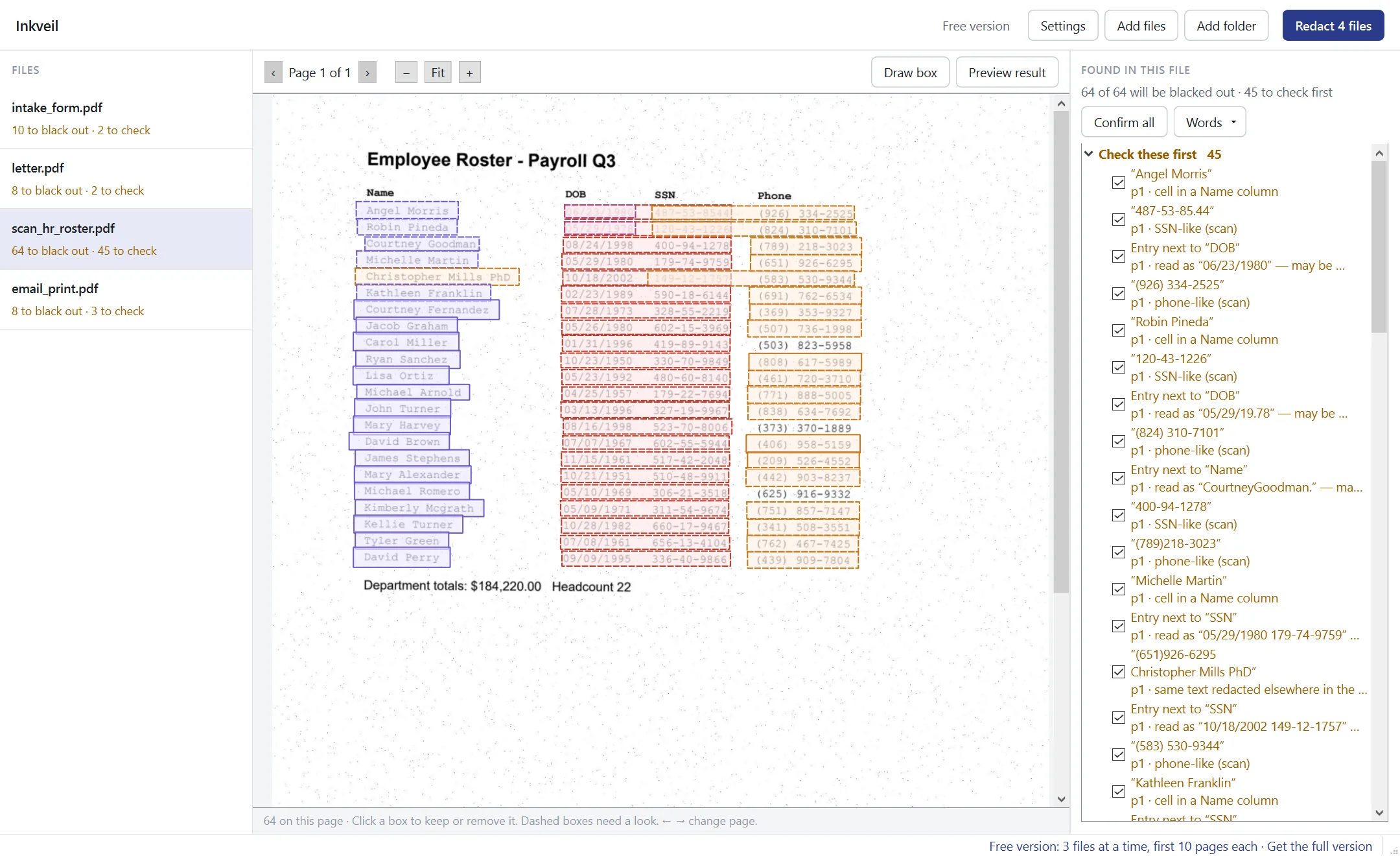
A scanned payroll roster where every name, birth date, SSN and phone number column is outlined

Scans and forms

Built for the messy files people actually have

  • Scanned pages are read on your PC, no upload, no cloud OCR.
  • Handwritten entries on forms are found by their printed labels — “Name”, “Telephone Number”, “Date of Birth” — and covered even when they can't be read.
  • Fillable PDF forms: every field named like a name, address or phone is covered.
  • Tables: whole SSN, DOB and phone columns, even when the scan garbles a digit.
  • Sideways pages, password-protected files and 100-page batches.

Proof, not promises

Every file is checked after it's saved

  • The saved file is searched for every removed item — in the text and inside the file itself.
  • If a removed number still appears elsewhere (say, the same date used twice), you're shown the pages and can black those out too.
  • A file that fails the check is deleted rather than left behind.
  • A CSV log per batch records what was removed, where and why — never the removed text itself.
  • Originals are never changed.
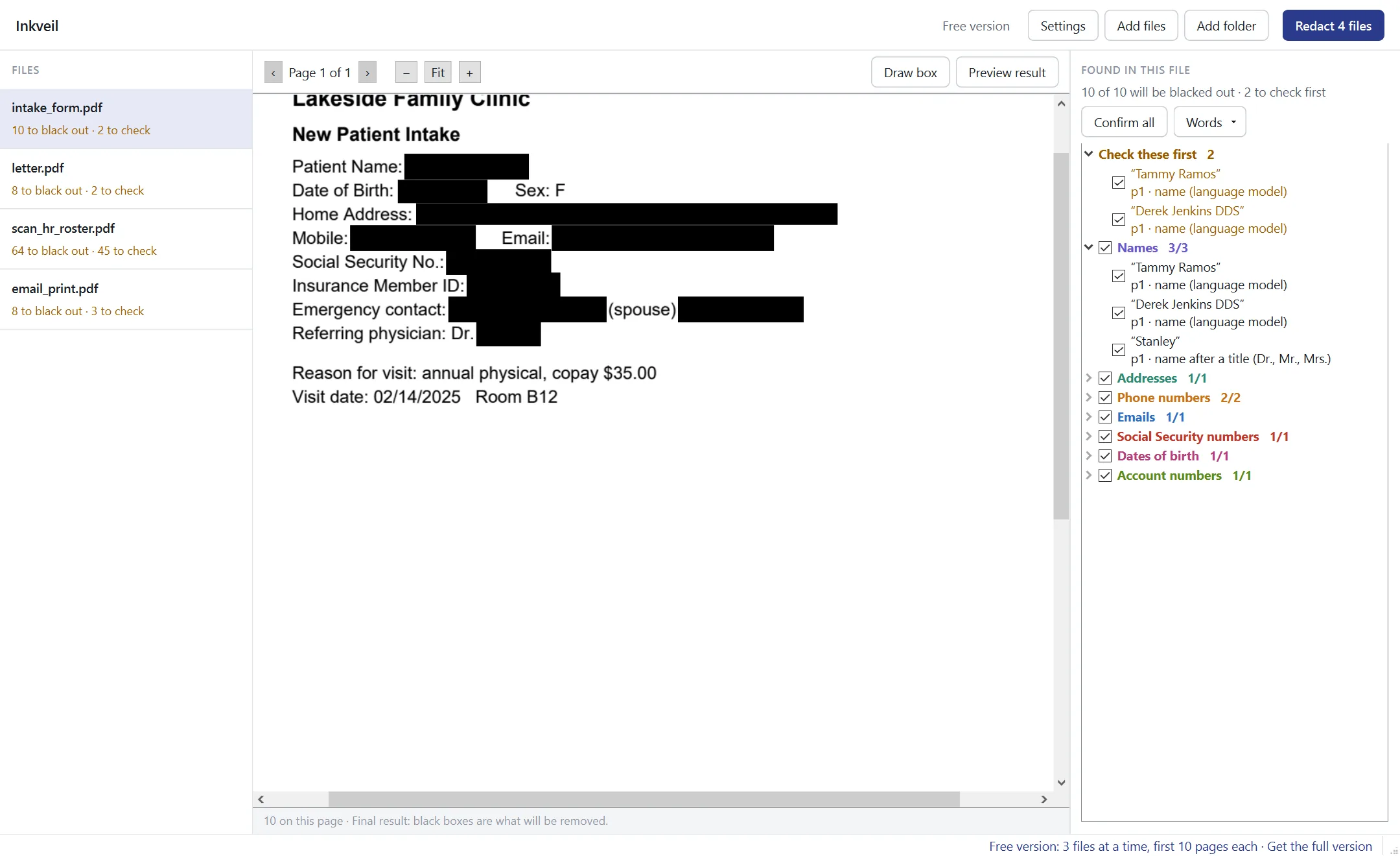
The same intake form in preview mode with solid black boxes where the personal data was

Pricing

Pay once, or just for the month you need it

No subscriptions. Nothing renews by itself, and no card is stored. 3 copies or more: 10% off. 5 or more: 20% off.

One project

Monthly pass

$1230 days

The full version for one case, one audit, one month.

Buy
Most chosen

1 year

$591 year

The full version on one computer for a year.

Buy
3 computers

Team, 1 year

$1491 year

Three people in the office, one key.

Buy
3 computers

Team, lifetime

$299once

Three computers, forever.

Buy
Gift

Give it to someone

Any licence

Choose “send as a gift” at checkout and pick the day it arrives in their inbox.

Buy as a gift
Free version — find and review everything; save 3 files at a time, first 10 pages each. Or try the full version free for 14 days.

Questions

FAQ

Do my files get uploaded anywhere?

No. Reading, OCR and redaction all happen on your computer. The program works without an internet connection; the licence is checked offline too.

Is it a real redaction or just a black box drawn on top?

Real. Every page with something removed is rebuilt from an image with the boxes burnt in, and the original text, fonts and drawings of that page are deleted from the file. Untouched words are put back as an invisible layer so the page stays searchable. Then the saved file is checked.

Will it find everything on its own?

Not always, and no tool will. Clear typed data is found very reliably; handwriting and poor scans are covered by their form labels but can't always be read, and unusual layouts can be missed. That's why every finding is shown for review and you can draw your own boxes.

What does the free version do?

Everything except unlimited saving: up to 3 files at a time and the first 10 pages of each file. The 14-day trial key removes the limits.

Which Windows versions?

Windows 10 and 11, 64-bit. About 400 MB of disk space. Installs for your user account without administrator rights.

Refunds?

If it doesn't work for your files, email us within 14 days for a full refund.